Book Scout — free Chrome extension
Research Amazon
on Amazon.
Sales rank, estimated sales, and niche stats on every book search — right on the page, before you commit months to a manuscript. Built for KDP authors.
Works logged-out. No card, ever.
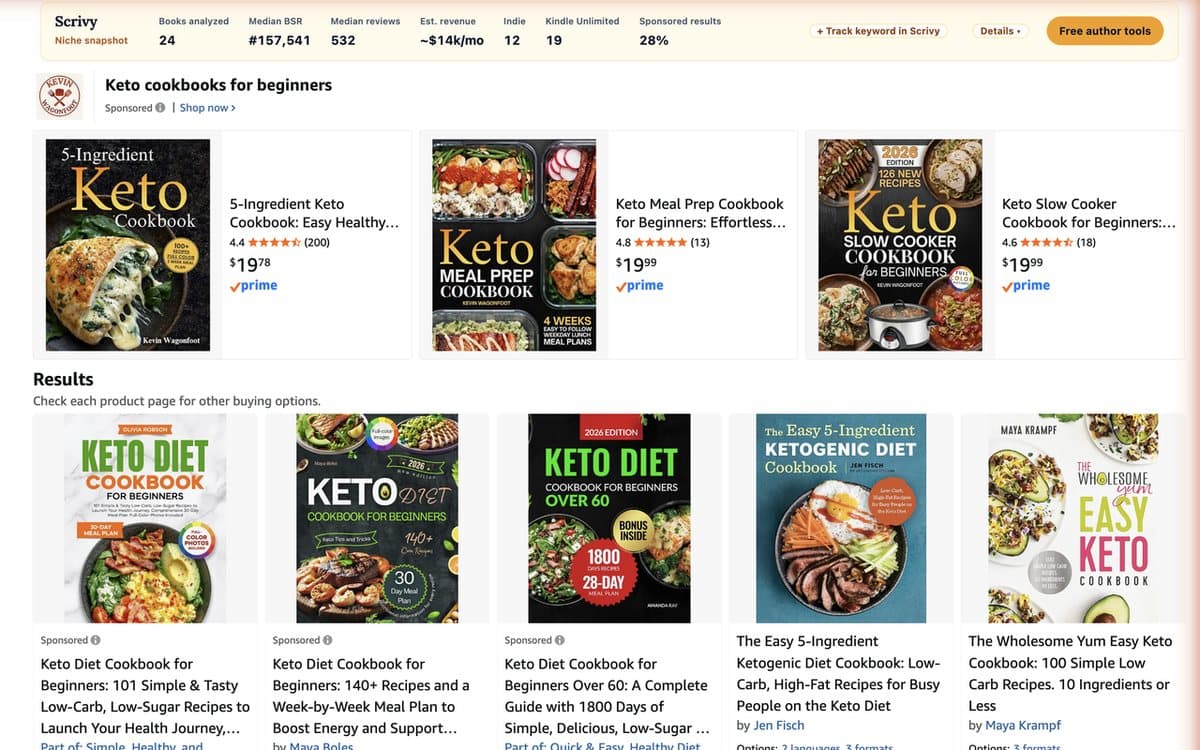
Every niche decision happens on Amazon. Your research should too.
Tab-hopping between Amazon and a research tool means retyping searches, pasting ASINs, and losing the thread. Book Scout reads the page you're already on: which books sell, what they charge, how crowded the niche is, and whether indie authors are winning there — in one glance.
How it works
Add it to Chrome
One click from the Chrome Web Store. No account needed to start researching.
Search Amazon like always
Every result grows a Scrivy badge: rank, estimated sales, estimated revenue.
Read the niche in one bar
Median rank, median reviews, and what the whole page earns per month — before you write a word.
Track what matters
Star any book and get a daily email when its rank, price, or reviews move.
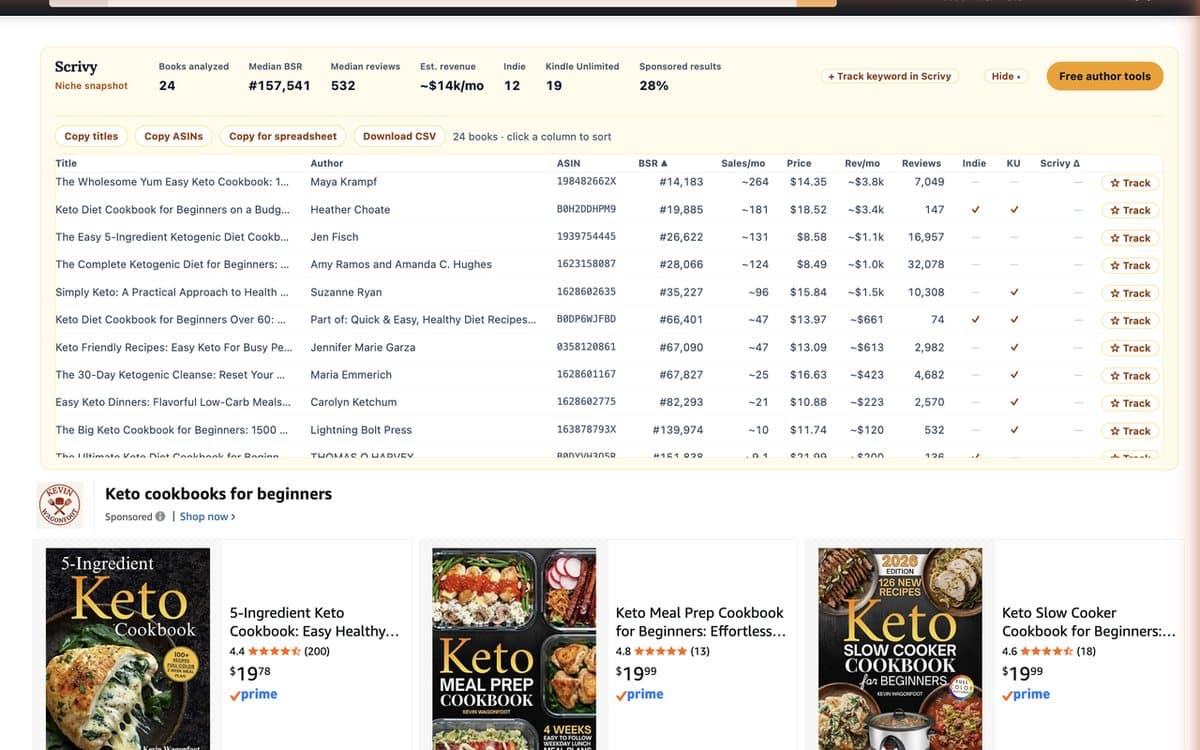
The whole niche, one table.
Expand any search into a sortable table: rank, estimated sales and revenue, price, reviews, indie and Kindle Unlimited flags for every book on the page. Copy the titles, copy the ASINs, or download the whole thing as a CSV.
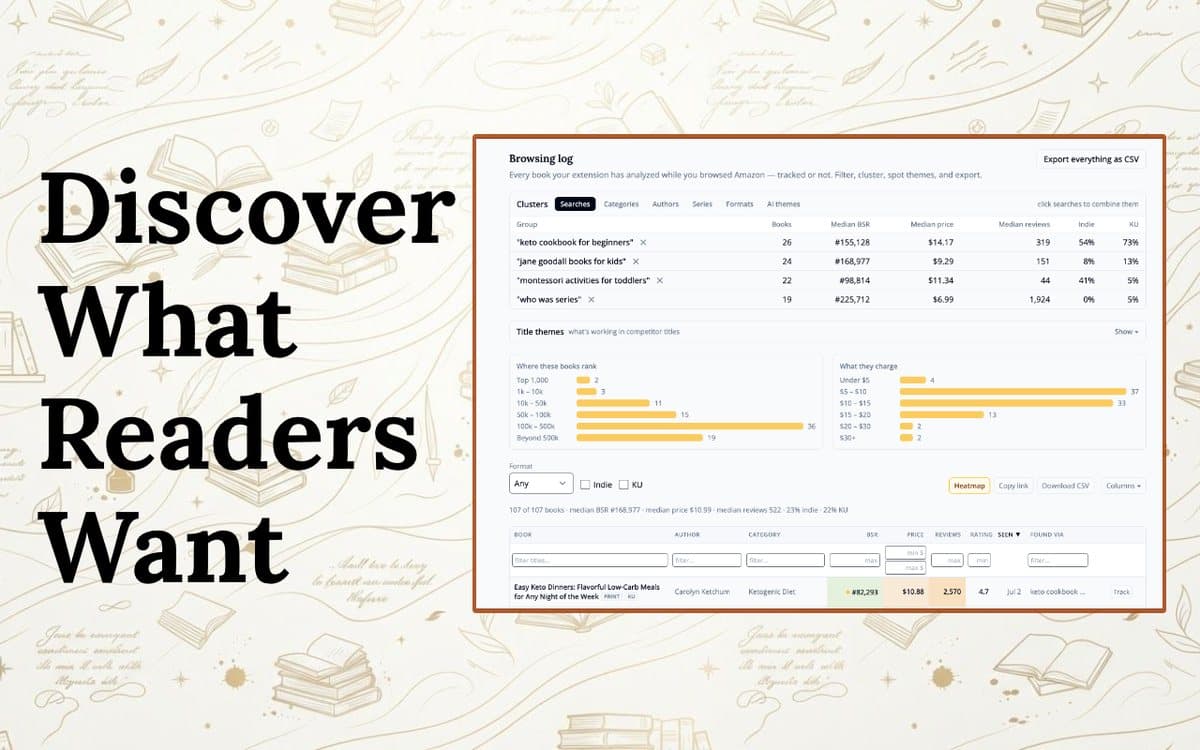
Your browsing becomes a research library.
Connect a free Scrivy account and every book you analyze is saved to your Book Scout dashboard — clustered by the searches you ran, with median stats per niche, the title themes that correlate with sales, and one-click export. Research in the morning, decide in the afternoon.
What's in the extension
Numbers on every result
BSR, estimated sales/mo, and estimated revenue/mo appear under each book on the search page.
Niche snapshot bar
Median BSR, median reviews, estimated niche revenue, indie share, and KU share for the whole search.
Sortable details table
Every result in one table — sort by sales, price, or reviews; copy titles or ASINs in a click.
Series X-ray
On any series page: publishing cadence, review drop-off across the series, and Goodreads ratings.
Tracking with email alerts
Follow your books and competitors. A daily digest lands when rank, price, or reviews change.
Research log & CSV export
Everything you analyze is saved to your Scrivy dashboard — filter by search, spot title themes, export.
Privacy, plainly
Nothing is transmitted until you connect a Scrivy account — analysis is local to your browser. Only Amazon book pages are read; anything else you shop for is discarded on your machine and never sent anywhere. No browsing-history collection, no data sales, and you can delete any search or book from your log at any time. The details are in the privacy policy.
Frequently asked questions
Is Book Scout really free?
Yes. The on-Amazon research — sales rank, estimated sales, niche stats, the details table, CSV export — works without even creating an account. A free Scrivy account adds book tracking with email alerts and your research dashboard. Every plan includes it.
Where do the sales estimates come from?
Estimated sales are derived from each book's Best Sellers Rank using the same BSR-to-sales model behind Scrivy's Book Sales Calculator. They are estimates — treat them as a way to compare niches, not as accounting.
Which Amazon sites does it work on?
Amazon.com is fully supported, with best-effort support for the UK, Canadian, German, French, Spanish, and Italian stores.
What data does the extension collect?
Nothing leaves your browser until you connect a Scrivy account. Connected, it saves publicly visible book data from Amazon book pages you analyze — and only book pages. No browsing history, no non-book products, no data sales. The privacy policy spells it out.
How does tracking work without my rank dropping in the middle of the night going unnoticed?
Your extension re-checks tracked books every few hours while your browser is open, and Scrivy emails you a daily digest when rank, price, or reviews move. Track your own books or competitors.
Does it slow Amazon down?
No. Analysis runs only on book search pages, product pages, and series pages, uses a small number of throttled requests, and caches results for a day. You can turn auto-analyze off in the popup and run it on demand.
Your next niche is one search away.
Add Book Scout to Chrome and read the numbers on the very next Amazon search you run. Free, on every plan.
Add to Chrome — Free